Identity Verification, Front to Back: An App and the System Behind It
Altius Digital 3 min read
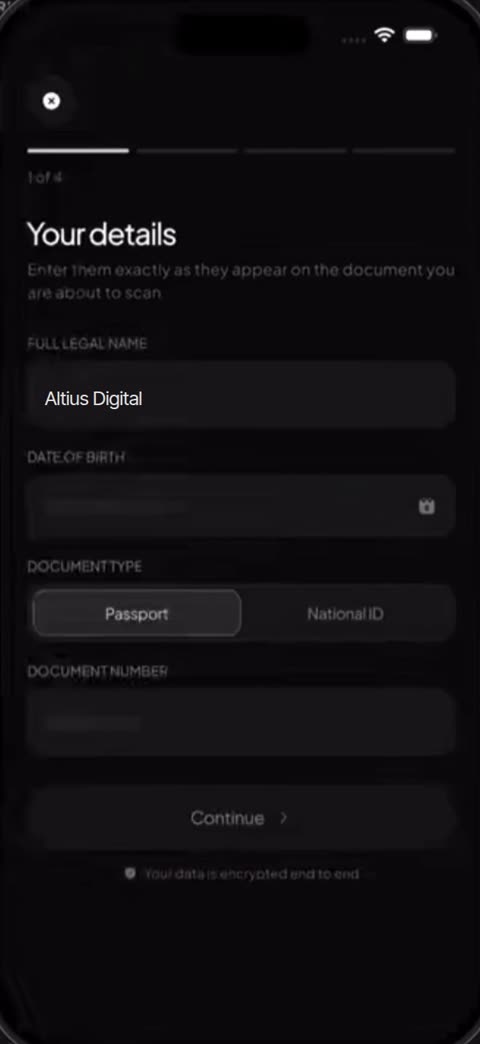
Identity verification is the moment a product asks for trust and has about a minute to earn it. We built this journey for a client we are not able to name, as a working demonstration of their verification system: the app people use and the backend that does the checking.
What you see above is the real app running, not a mock-up. We have replaced the client’s details with our own.
What it does
Someone opens their profile, taps Verify your identity, and the app walks them through four steps.
- Your details. Full legal name, date of birth and document number, entered exactly as they appear on the document.
- Scan your passport. The camera reads the document while a progress ring shows the printed data being read, then confirms it is authentic.
- Face verification. A quick liveness check confirms the document belongs to the person holding the phone.
- Verifying your identity. Four checks run and tick off one by one: document authenticity, biometric face match, liveness confirmed and watchlist screening.
Then the account is marked Identity verified and the higher tier is unlocked.
The two halves
The app is the half people notice. We designed every screen so each step feels short and obvious: one task per screen, a progress bar that always shows where you are, and plain language about what is happening and why.
The backend is the half that matters. Each step calls a service that does the real work: validating the document, matching the face to it, confirming liveness, screening against watchlists and finally updating the account’s status. The app never decides anything on its own; it shows the result the system returns.
Building both halves together is the point. The screens could be designed around what the checks actually need, and the checks could return exactly what the screens need to show.
What we built
The app. Profile and verification entry point, the four steps (details, document scan, face check, verifying) and the verified state, each as its own screen with a progress bar and one task at a time. Designed so the whole journey takes about a minute.
The backend. Four services, one per step, that the app calls in order:
- Document check: reads the printed data from the passport scan and confirms the document is authentic.
- Face check: matches the live face to the document photo and confirms liveness, so a photo of a photo fails.
- Screening: checks the person against watchlists.
- Status: marks the account verified and unlocks the higher tier, so the rest of the product can trust that flag.
The rule that ties them together. The app never decides anything on its own. It shows exactly what the system returns, which means a failed check cannot be skipped from the phone and the audit trail lives on the server, where it belongs.
Design system. Dark, calm screens, the client’s own brand colours and type (replaced with ours in the demo above), and copy that explains why each step is needed.
Why it matters
A verification flow that is slow, confusing or fragile loses the customer at the most expensive moment: after they have decided to sign up. One that is quick and clear turns a compliance requirement into a reason to trust the product.
If your business needs to verify who it is dealing with, whether for onboarding, payments or access to higher limits, this is the kind of system we build: the front end, the back end and the checks in between.